
The 2024 annual report for Parkland Health Foundation was launched in March of this year (2025) and it was my privilege to drive the design and development of this site. When I do freelance work, I typically reach for Pro Theme by Themeco to build pages on top of, but this project had a few requirements that made development unique:
- Although Parkland Health Foundation has an established brand, there wasn’t a ton of visual direction to go on for this site, so I leaned on Themeco’s Design Cloud as a quick jumping off point for designs.
- I knew the site was going to be feature some long form stories/content, so using the Block Editor was going to be crucial.
- A primary feature of the site was searchable donor lists provided as CSV, so I would need a simple way to upload lists that got auto-formatted correctly.
Because of these requirements, the site is built with Pro Theme and custom php templates for front-end display and the Block Editor and Advanced Custom Fields (ACF) to power content.
Establishing the Brand
While the brand for the site was already established (it is a continuation of the Parkland Health Foundation’s main site with some minor tweaks), the unique challenge here was getting three different design systems to work together. Pro Theme has its own way of handling variables for color and typography, the Block Editor (aka Gutenberg) has another way of defining variables, and I knew I was going to be writing some custom CSS (leaning on Bootstrap 5). The solution: start with the theme.json file.

WordPress-first styling
Although Pro Theme has global settings for color variables, I knew that ultimately the Block Editor needed to be the single source of truth for styles, as that was the area that had the highest potential for “free-range user content.” Parkland could write content and use Gutenberg’s blocks years later and I would have no control over its look without setting some controls here. By using the theme.json file, I was able to define brand colors and typography while allowing Parkland the freedom to write however they wanted—an excellent combination of brand standards and content flexibility.
I discovered (pleasantly) that Pro Theme can hook into CSS custom properties for its global colors setting, so declaring the site’s styles with theme.json kept all the site’s styles neatly tied together. This also helped me define a standard type scale for fonts (which is my main gripe with Pro Theme’s component & design system). From here, it was a simple matter of using generated CSS variables in my own CSS to keep things in sync.
Building a search feature

Based on a UX design from Children’s Health‘s annual report website, the Parkland team had asked for a “find your name” search feature on the site. The UX bit in reference was a simple note that encouraged users to use their browser’s search feature to find their name (Cmd/Ctrl + F). Wanting to provide something better, I rolled a Javascript-powered search feature with Fuse (a fuzzy-search enabled Javascript library) to let users find their names as a progressive enhancement for this text + browser-based feature.
See the code
- You can see the entry point for my JS code here on Github
- The
divwith the id of “form-container” initially renders some HTML instructing users to use their browser’s search feature, but that gets cleared and replaced by Javascript on load.

Content, Liberated
Something that those who help drive the WordPress project forward have been talking about recently is data liberation—the idea that your website should be truly yours and not “locked into closed platforms” like Wix or Squarespace, all the way down to the codebase. Due to the transient nature of freelance web dev and web design, I know that in a year’s time, Parkland may choose to go with a totally different web design with a totally different theme—heck, they might even leave WordPress and go with a different platform altogether. Part of what I wanted to achieve was building a sustainable platform with tools that made it easy for them to do what made the most sense for them both at site launch and in the future.
Although Gutenberg has been pretty polarizing, I find it is an excellent tool for writing content. By designing this site to have the bulk of its content powered by the Block Editor, Parkland has the freedom to change themes or leave WordPress altogether and have a simple way to export their stories and leave the design behind. With a visual builder like Pro Theme or Elementor (which powers their main site), if they wanted to use a different theme or visual builder, they would have to manually migrate their content out.
Content, without Visual Builder clutter
For pages like the home page or donor list pages, where the amount of content is small but there’s a lot going on visually, I opted for an even simpler design—“classic” WordPress with Advanced Custom Fields. With this design pattern, I opted for super simple boxes with hints about what everything did, so it was very clear which content sections were controlled.
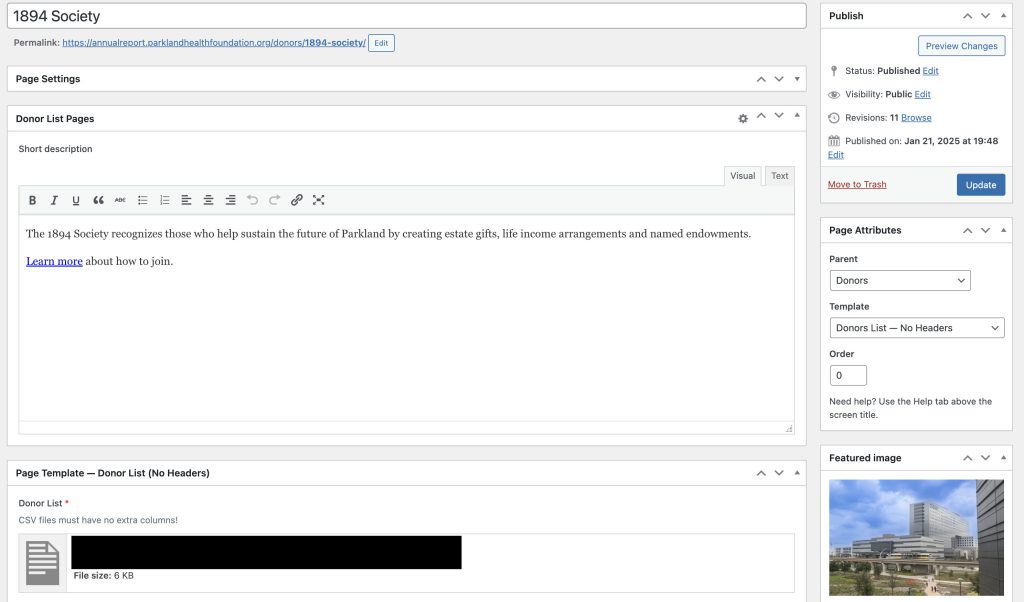
Pages that list donors could have a potentially very long list of names provided via CSV. If you were using a visual builder, you would either have to manually copy and paste those names out of the CSV and into the visual builder or, for brevity’s sake, you’d have to be a developer. In the same vein, parts of the website (like the Board Members) are powered by custom post types and ACF.
Ultimately, if you’re going to have to load a visual builder—Cornerstone (which is what powers Pro Theme) or Gutenberg—that visual builder is going to take time to spin up. Is the task of editing content simple? Yes. However, that load time (and maybe even the user interface) may create some mental roadblocks that slow down (or even prevent) one from getting the job done. With this development pattern, if you don’t need it, you don’t even see it—helping to keep Parkland’s team as agile as possible.
Conclusion
I want to wrap this up with a word on open source. All of this site’s code is released under open source licenses, meaning it is freely available to anyone to use for their own purposes. I wouldn’t be where I am today if it weren’t for great open source technologies, and I believe it’s important to pay it forward. Although Parkland is a publicly funded hospital, the Parkland Health Foundation exists to bridge the gap when funds fall short of operational costs. A great annual report reminds donors why they give and can inspire new donors to start their own journey. I’m proud of my contribution to Parkland’s mission, and I wanted to release code in a way that allowed Parkland to own it and for others to benefit from it. Even in writing this wrap up, I hope to help other developers think critically about how they design systems (not just websites) that help organizations do more, go further and reach more people.
I love helping local organizations, and it was a real privilege to play a small part in what Parkland is doing for the Dallas area.