
How I combined React Router, Vite, and the WordPress Interactivity API to build a mobile-first loyalty web app.
WordPress isn’t usually the first platform that comes to mind when building a single-page application (SPA). But what if WordPress is already your platform, and you need to build something that feels more like a native mobile app than a traditional website?
That’s the challenge I faced while developing Chahta Rewards, a web application for the Choctaw Travel Plazas loyalty program.
The goal was straightforward: let customers sign up, check their points, browse offers, and redeem rewards without downloading the existing mobile app.
In the marketing arm of the Choctaw Nation of Oklahoma, our tech stack is limited to WordPress and GitHub Pages. Rather than introducing a separate application platform, I wanted to see how far I could extend WordPress while keeping everything integrated into the existing site.
The result was a custom plugin combining a React 19 SPA, the WordPress Interactivity API, and a PHP backend that communicates with PDI Technologies’ Loyalty API.
The architecture: two frontends, one plugin
I divided the application into two parts based on the kind of interaction each needed.
- WordPress handles the entry points: account registration, login, and password recovery. These are custom Gutenberg blocks using the WordPress Interactivity API.
- React handles the application itself: the dashboard, account management, offers, rewards, transaction history, and locations.
Both live in the same WordPress plugin and communicate with custom WordPress REST API endpoints.
The backend acts as a backend for frontend (BFF), handling authentication, communicating with PDI, and transforming API responses before they reach React.
This separation meant I didn’t need React’s weight to power simple WordPress forms, but I could still use its full capabilities for the more complex application.
Mounting React inside a Gutenberg block
The React application lives inside a custom dynamic block called ctp/rewards-app.
Its PHP render file is intentionally minimal. It outputs a container with a data-ctp-rewards-app attribute, which React uses as its mounting point.
The application runs on its own WordPress page at /rewards/app.
That page uses a dedicated theme template with custom header and footer files that are basically blank. The template avoids the standard theme layout and unnecessary scripts and styles.
This was an important decision. My React application needed control over its own viewport, scrolling behavior, navigation, and layout. Fighting against the existing theme’s CSS would have made that much harder.
The plugin also checks whether the current page contains the Rewards App block before removing default WordPress styles and printing application-specific metadata.
The principle: WordPress owns the page, but React owns the experience inside it.
Making React Router work with WordPress URLs
Getting React to render wasn’t particularly difficult. Routing was the more interesting problem.
React Router handles navigation once the application loads. However, if a customer refreshes /rewards/app/account, WordPress still needs to know what to do with that request.
Without a server-side routing rule, WordPress would try to resolve the URL as a normal page.
I solved this using the WordPress Rewrite API:
public function handle_rewrites() {
    add_rewrite_rule(
        '^rewards/app(?:/.*)?$',
        'index.php?pagename=rewards/app',
        'top'
    );
}
This sends requests for /rewards/app and its nested paths to the same WordPress page.
React Router is configured with basename: '/rewards/app', so it can manage the application routes relative to that path.
That gives me two routing layers with clearly defined responsibilities:
- WordPress: Resolve the initial HTTP request and serve the application.
- React Router: Render the appropriate screen and handle client-side navigation.
React Router’s loaders and actions also handle data loading and mutations. This keeps route-specific behavior close to the components that use it.
I added loading skeletons and navigation states so customers receive visual feedback while data is being fetched, rather than staring at an unchanged screen.
Integrating Vite with WordPress
The plugin uses two separate build processes.
I use @wordpress/scripts to compile the Gutenberg blocks and Vite to bundle the React application and Tailwind CSS 4.
In development, Vite provides hot module replacement and React Fast Refresh. In production, Vite generates optimized assets with hashed filenames.
WordPress needs a way to find those files.
I created a Vite_Asset_Handler PHP class that reads Vite’s production manifest.json to identify the correct JavaScript and CSS files.
The handler registers the JavaScript bundle using wp_register_script_module() and registers the associated stylesheet. The Rewards App block references those handles through its viewScriptModule and viewStyle metadata.
This lets WordPress load the application assets when the block is rendered, without hardcoding filenames that change with each build.
For local development, the handler detects the Vite dev server through a hot file and prints the necessary module scripts, including the React Refresh preamble.
The result is a React development workflow running within the real WordPress page, without needing to build the production bundle after every change.
Using the Interactivity API alongside React
One architectural decision I’m particularly pleased with was using the WordPress Interactivity API for the account-related blocks.
Registration, login, and password recovery are conventional forms. They need client-side validation feedback, submission states, and occasional UI interactions, but they don’t need an entire React application.
Each block renders its form using PHP and uses Interactivity API directives to connect the markup to a JavaScript store.
For example, the login block uses directives such as:
data-wp-interactive="ctp-rewards/login"
data-wp-on--submit="actions.submitForm"
data-wp-bind--disabled="state.isSubmitting"
The JavaScript store handles submission through a WordPress REST endpoint, updates the loading and error states, and redirects to /rewards/app after successful authentication.
The registration form uses the same general pattern, including a show/hide password control.
This gave me a useful separation of concerns:
The Interactivity API enhances WordPress content. React powers the application.
Both approaches coexist without needing to share component state or render inside one another.
WordPress as the API integration layer
The React application doesn’t communicate directly with PDI.
Instead, it makes requests to custom WordPress REST endpoints under /wp-json/ctp-rewards/v1/.
Those requests pass through PHP controllers, services, and API client classes responsible for communicating with PDI.
One reason for this separation was authentication.
PDI uses two independent authentication systems: application-level API tokens and individual member tokens. Both have their own refresh processes.
I implemented a custom session system using a WordPress database table and browser cookies.
When a member logs in, WordPress authenticates them with PDI, creates a local session, and sends an HTTP-only cookie to the browser. The session identifier is hashed before being stored in the database, while PDI member tokens remain server-side.
React then communicates with WordPress using credentialed requests rather than storing PDI tokens in the browser.
Importantly, these are loyalty-member sessions, separate from WordPress user accounts.
The integration layer also handles PDI’s inconsistent data structures.
For example, a single customer purchase can generate separate transaction records for points earned, points spent, and rewards redeemed.
Rather than exposing those records directly to the UI, I wrote normalization logic in PHP to group related activity by date and transaction reference, producing a customer-friendly transaction history.
WordPress transients provide caching for selected API responses, reducing unnecessary calls to PDI.
Keeping this logic in PHP means React receives data shaped for the application instead of needing to understand every detail of PDI’s API.
Making the web feel like a native app
An SPA isn’t automatically a good mobile experience.
Beyond client-side routing, I spent time adapting the application to the interaction patterns customers would expect from a native app.
The interface uses persistent navigation, route-specific layouts, loading skeletons, and dialogs that can animate into view as bottom drawers.
Native HTML elements, including <dialog>, provide a foundation for more accessible interactions. Forms also use labeled fields and status messages to communicate loading and errors.
I added a web app manifest, application icons, standalone display metadata, and Apple-specific metadata to support adding the experience to a device’s home screen.
The current implementation is PWA-style, rather than an offline-first PWA. The v1 plugin includes installation metadata but does not implement a service worker for offline functionality.
The priority for this release was making the browser experience competitive with the existing mobile app, not reproducing every native capability.
Altered UX/UI
The each version of the app—web and native—have some quirks. For example:
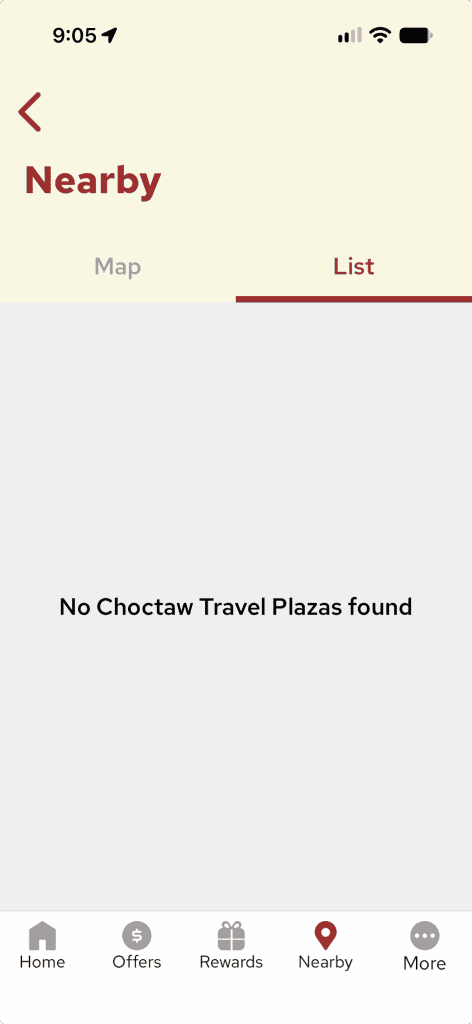
- the mobile app feels slow and old.
- It uses spinner overlays, slow fades, and some unnecessary screen transitions.
- If you’re too far from any Travel Plazas, tapping on “Nearby” shows a blank map and a blank screen
The web app improves some UX, but also lacks some things:
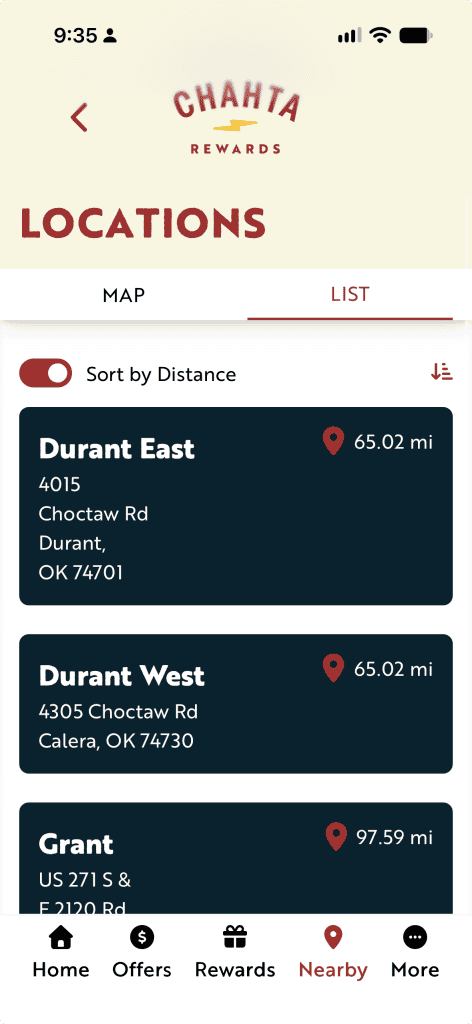
- it uses the aforementioned skeletons and the relatively new
view transitionsapi to give it an app-like feel, but I ran out of time to design some of layering one might expect from a fully native app - The PDI REST API doesn’t expose offer/reward images anywhere except for one specific endpoint, so the web app is a less visually-appealing experience
- The “Nearby” tab is never empty
- The list view uses the device location to sort travel plazas by distance, and each travel plaza can be tapped on to see more location-specific details (mirroring the main site’s ux)
- The map view loads a Leaflet map using the device location and always shows all the travel plazas on the map by default.
What I learned
Given that this project was truly copiloted by AI, here are a few things I learned:
- DTOs help me back into an anti-corruption layer (the app isn’t properly set up that way, but the big idea is there)—either side of the app can change independently because of this layer
- Custom DB tables for custom session handling are the way to go over transients (my first thought)
- Unit Tests are less helpful than they used to be with AI copiloting as much as it did
The biggest takeaway was hammering home the usefulness of layered/hexagonal architecture and using WordPress as a backend-for-frontend. Using a PDI client layer, service classes for orchestration and wiring all that up for how WordPress wants to work is a practice that I’m sure will serve me well in the coming months as the Choctaw Nation looks to do more with federated, decoupled, and headless architectures.
I developed the plugin independently, using AI coding assistants to help with research, problem-solving, and implementation. The process reinforced the importance of understanding the architecture and testing integration behavior, particularly when multiple frameworks and authentication systems are involved.
The result
Chahta Rewards v1.0.0 launched mid-October 2026.
Customers now have a browser-based option for accessing the loyalty program, while the organization has a foundation for expanding the web experience alongside its native mobile app.
For me, the project was also a practical demonstration that a modern React application can live comfortably inside WordPress—as long as each technology has a clear responsibility.